
Why implant cases get stuck
The scenario is familiar. The clinic scans with one brand's scan body. The case arrives at the lab. The technician opens the design software and searches for a library entry that matches this specific implant, this specific scan body revision, and includes a printable analog. It is not there, or it loads but reads the geometry wrong, or the analog is missing.
The OEM support line says the CAD software is not supported. The CAD vendor's support line says the library is the implant company's responsibility. A single revenue-bearing case sits idle, and hours of technician time vanish trying to find a chain that works.
None of this is anyone in the loop's fault. The ecosystem is structurally fragmented. What follows is a working map of it.
The compatibility chain
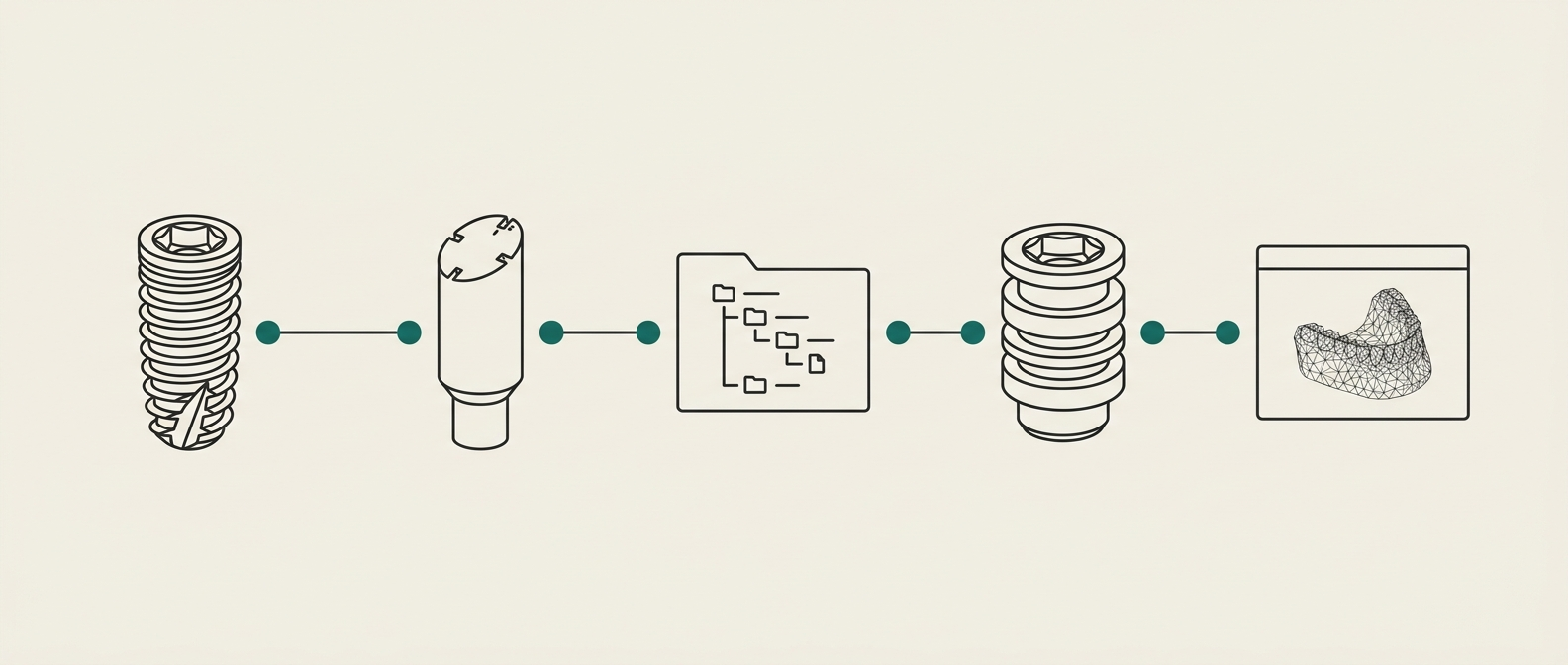
A break at any one of these links stalls the case. The implant and scan body have to physically match. The library has to describe that specific combination. The analog has to exist in a form the lab can print or order. The design software has to recognise all of the above. Five links; every one has failure modes.
The six failure modes
The library downloads but never appears
Folder structure and index-file trivia decide success. A correctly downloaded library placed one directory too high or too low is invisible to exocad and 3Shape.
Scan body revision does not match the library version
The same implant system ships multiple scan-body revisions over time. A library built for one revision misreads geometry from another, and the misread is silent — the case designs, and fails on seat.
No printable or model analog in the library
Without a matching analog geometry the lab cannot print a working model. The design software may still let the design proceed; the physical case cannot.
Angled screw channel and multi-unit edge cases
ASC drivers, custom hybrid abutments, splinted multi-units and Ti-Base combinations each require specific library variants. Generic libraries usually will not cover them.
OEM support dead-ends
A common answer from implant-vendor support is "we do not support that CAD software." The case still needs to be designed and delivered. Someone has to bridge the gap.
Licensing sprawl
Full library coverage across major brands costs a lab roughly $25,000 to $45,000 per year in licences, before the operational cost of keeping them installed and current.
exocad: what to know
An exocad implant library is not a single file. It is a set of geometry and index files distributed across two parallel trees: the implant library (used during abutment and crown design) and the model-creator library (used to generate the printable model with a working analog). A library that only populates one tree will design a case that cannot be produced.
library/implant/
└── [ImplantSystem]/
    ├── implantlib.xml
    └── geometry/
library/modelcreator/
└── [ImplantSystem]/
    ├── analoglib.xml
    └── geometry/
Two parallel trees, illustrative structure. A library that populates only one of them designs a case that cannot be produced.
Version pitfalls are common. exocad releases (Rijeka, Elefsina, DentalCAD 3.x) change library expectations in ways that are not always signalled in vendor library downloads. A library built for an older release can install cleanly on a newer one and quietly misread a scan-body reference. When a case designs but does not seat, this is the first place to look.
Practical rules: keep implant libraries and model- creator libraries in sync by system; record the exocad version each library was tested against; never overwrite a working library folder — version it.
3Shape: what to know
3Shape distributes implant support through the Dental Materials Explorer (DME) system. Libraries install as DME files, and are managed centrally rather than by hand-editing folders. This is more robust than exocad's approach for the common case, and more opaque when something is wrong: a DME that installs "successfully" can still be missing kits or analogs.
Cross-platform labs — those running both 3Shape and exocad — routinely hit the mismatch between how each system names, versions and packages the same underlying implant. A library for implant X on 3Shape and a library for implant X on exocad are not the same file with a different extension. Each has to be verified independently.
For a broader view of how these platforms sit in the full digital workflow, see the digital dental lab guide.
What verified compatibility means
Verified compatibility is the state where every link in the chain has been tested together on a real case before the clinical case depends on it. Our method:
- Confirm the exact implant system, scan body revision, abutment or Ti-Base variant and analog format for the case.
- Install or repair the matching library in the target design software; record the software version.
- Run a test design against a reference scan; confirm the analog exports correctly for the lab's printing or ordering workflow.
- Document the verified chain — implant, scan body, library version, software version, analog — so the same case type is a lookup next time, not a re-investigation.
Verification record — sample
- Implant system
- Conical connection, Ø4.3
- Scan body
- Rev. 2, intraoral
- CAD library
- v2.4 — implant + model creator
- Analog
- printable, verified
- CAD release
- DentalCAD 3.2
- Chain status
- ✓ verified on test case
Illustrative sample — this is how we document a chain before your case depends on it.
A maintained, versioned stack turns implant libraries from a per-case hazard into infrastructure.
Library sources by system
Per-system directory pages: where the official exocad and 3Shape libraries live, which third parties cover the system, scan-body notes and documented pitfalls — every fact source-linked.
Straumann (Straumann Group)
Straumann BLX / BL (Bone Level)
Library sources →
Nobel Biocare
Nobel Biocare Conical Connection (NobelActive / NobelParallel CC)
Library sources →
Dentsply Sirona
Astra Tech Implant System EV
Library sources →
Zimmer Biomet (dental division spun off as ZimVie Inc. in 2022; TSV is now sold and supported by ZimVie)
Tapered Screw-Vent (TSV)
Library sources →
BioHorizons
Tapered Internal
Library sources →
Neodent (Straumann Group)
Neodent Grand Morse
Library sources →
MegaGen
AnyRidge
Library sources →
Osstem Implant (sold in North America as Hiossen)
Osstem TS / Hiossen ET
Library sources →
Library rescue, as a service
Send us the stuck case or the broken library. We identify the correct chain, repair or install what is missing, verify the full workflow end to end, and hand back a documented library and a working case file. Per- case quote, answered the same day. This pairs with our CAD design services when a case also needs a designer on it.
Frequently asked questions
Why doesn't my downloaded implant library show up in exocad?
Almost always a folder-structure issue. exocad expects specific subfolders and filenames inside the implant and model-creator library trees, and it will silently skip anything it does not recognise. A library that ships as a single zip often needs to be split across the implant library and the model-creator library, with the correct index files updated. If nothing appears after a rescan, the placement is wrong, not the download.
Are exocad and 3Shape libraries interchangeable?
No. The geometry is often the same underlying implant, but the file formats, folder conventions and metadata are different, and neither system reads the other's library natively. Cross-platform labs maintain both, or use a conversion and verification step per case.
What is a scan body and why does the brand matter?
A scan body is a machined component that screws into the implant during the intraoral scan. It has a known geometry the CAD software recognises to infer the implant's position and orientation. The library must match the exact scan body used — the same implant with a different scan-body revision reads as a different case, and the resulting abutment or crown will not seat.
Can I use third-party scan bodies with OEM libraries?
Sometimes, but only when the third-party scan body has a documented match in the OEM library, or a verified third-party library exists for that specific combination. Assuming compatibility because two parts fit the same implant mechanically is where cases go wrong. Verify the full chain before running the case.
What does Occlaris library rescue include?
You send us the stuck case, the scan body used and the software you are running. We identify the correct library, repair or install it, verify the full chain — scan body, library, analog, export — against a test case, and document the versions so the fix is repeatable. Per-case quote, answered the same day.